Tutorial: a publication figure from public image data¶
Which entry point: this tutorial builds a project already brought in and looks at its structure. In this project the analysis script quantifies the images and places the panels itself — the shape a Case A port takes. The three entry points are in guide, chapter 5.
You follow the whole of fig-atlas with data that are not NGS. From the public microscope image set BBBC013 you make a three-panel figure showing FKHR-GFP in U2OS cells moving from the cytoplasm into the nucleus under Wortmannin.
- a: two representative images (no drug, 150 nM)
- b: the nuclear/cytoplasmic GFP ratio per well, with a statistical test
- c: a dose-response curve
The finished example is in the repository (project pilot-imaging), so this page explains what each file does while you build it yourself. The omics pack is not used: the core (fig_atlas) alone goes all the way.
You need: a Python environment where pip install -e . was run at the repository root (see the README's installation section). It takes about 10 minutes, including the data download (31 MB).
1. Get the data¶
python scripts/fetch_bbbc013.py
192 images (96 wells × 2 channels) and the plate map are downloaded to raw_data/pilot-imaging/bbbc013/. They are checked against SHA-256 values fixed in the script, so everyone who downloads them can confirm they have the same files. raw_data/ is a folder git ignores, and the originals are never changed after download (AGENTS.md §1.1).
The data are under the CC BY 3.0 licence (Ilya Ravkin, Broad Bioimage Benchmark Collection). The script's header has the source and the citation, and the figure legend includes them.
2. The three files of the project¶
| File | What it does |
|---|---|
configs/config_pilot-imaging.yaml |
Every adjustable value: figure size, wells used, segmentation settings, display ranges, colours, text sizes. Each value has a comment with its role, unit and which way to adjust it |
analysis/pilot-imaging_analysis.py |
Reads and quantifies the data, then draws with renderers. It holds no style numbers; it reads them all from the config |
figure_specs/figure_01_pilot-imaging.py |
The figure's title, panel notes and claim boundary. Numbers in the legend use values the analysis recorded, such as {n_control_wells} |
The core of the analysis script is short.
- a, images: passes the two original files (GFP, DNA) to
render_image_panel, which applies the crop, display ranges and colours of the config. No brightened copy is made beforehand (AGENTS.md §4.7). - b, quantification: finds nuclei with an Otsu threshold on the DNA channel, takes a ring around each nucleus as its cytoplasm, and computes the GFP ratio per well. The test is run with
fig_atlas.stats(Welch), and the test table is registered withstats.record.render_bar_scatterdraws the bars and dots. - c, dose response:
render_line_banddraws the mean ± SEM per dose and the per-well dots on a log axis. - Numbers in the legend: the numbers of wells and nuclei, the image size and the test description are recorded with
claims.record. - Source Data: the tables panels b and c draw are registered with
source_data.add.
3. Build¶
fa build pilot-imaging --preflight
One command runs analysis → publishing → checks. You should get [ok] pilot-imaging: 0 error(s), 0 warning(s) and PASS: 12/12 checks passed. The figure comes out like this:
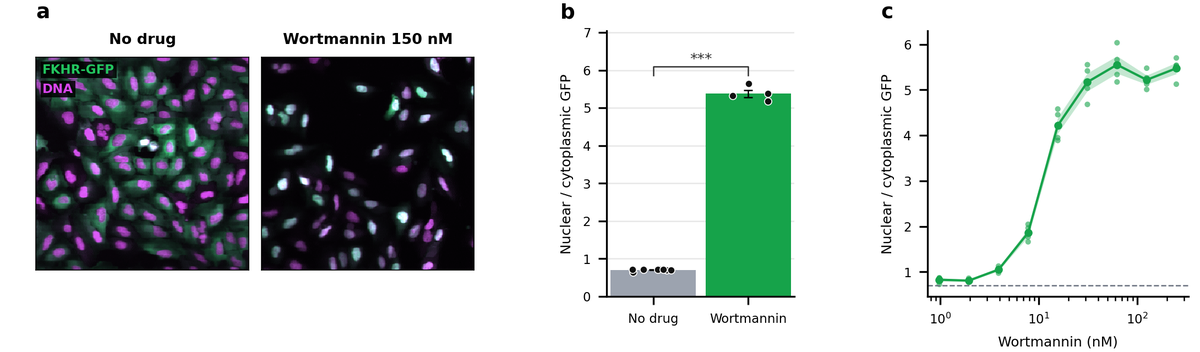
Without the drug, GFP (green) is spread through the whole cytoplasm; with Wortmannin it gathers in the nucleus, and the nuclei look bright cyan. b and c show this in numbers.
- preflight: checks at the real printed size that text and lines are not too small, that texts do not overlap, that text contrast is enough, and more. If there is a problem, a picture marking where it is appears in
outputs/preflight/pilot-imaging/. - verify: checks that the published files, the values recorded for the legend, the test table and the hashes of the original images all agree.
4. The results¶
outputs/pilot-imaging/figures/figure_01_imaging_translocation/ holds:
| File | Content |
|---|---|
figure_01.{png,pdf,svg} |
The figure, drawn 1:1 on the A4 text width |
README.md |
The legend (with the recorded values filled in), statistics table, Source Data, the Images section, a summary of the provenance record |
figure_01_statistics/ |
The Welch test table |
figure_01_source_data/ |
The values each panel draws |
figure_01.provenance.json |
Input hashes, code versions, the effective settings, the image adjustments |
The README's Images section lists panel a's original files, crop coordinates, display range and colour per channel, and the originals' hashes. You can use it as it is for the image adjustment disclosure journals ask for.
To see where the figure came from:
fa lineage pilot-imaging        # output <- run <- config <- code <- data
fa verify pilot-imaging         # what changed since publishing (FAIL if an original image changed)
5. Adjust the figure in the config alone¶
The Python code is not touched. For example, in configs/config_pilot-imaging.yaml:
- If the images are too dark, lower the upper values of
plots.images.display_ranges. The value is a[min, max]per channel, in the order ofchannel_labels(GFP, DNA). To brighten only GFP, for example, change[[0, 160], [0, 140]]to[[0, 100], [0, 140]]. Both conditions get the same range, so the comparison stays fair. - To show another field of view, change
plots.images.crop. - Setting
plots.images.gammato a value other than 1 is a nonlinear adjustment. It builds, but verify warns that the legend must say so.
Below is panel a built again with only the GFP range changed. On the right the GFP (green) is brighter; it is a linear adjustment, so the README's Images section records the new range as it is.
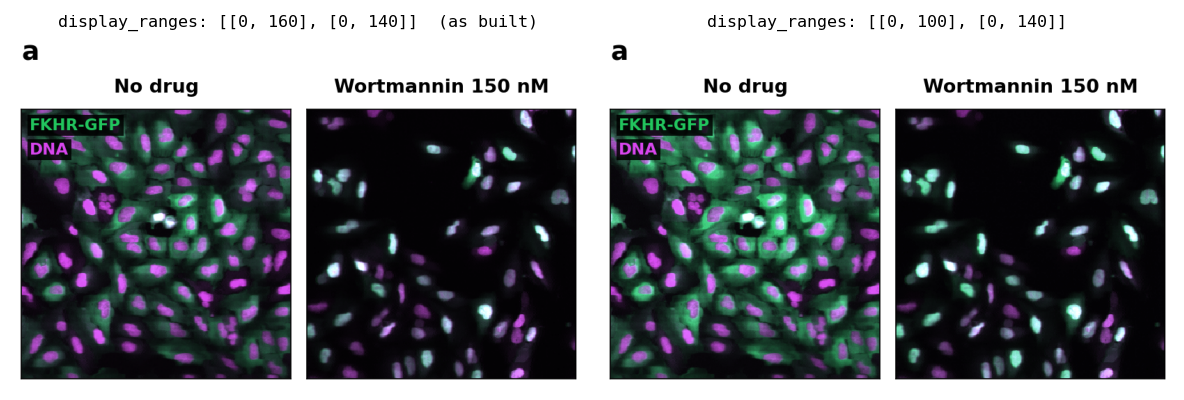
After a change, run fa build pilot-imaging --preflight again. To see where a value came from, use fa param explain pilot-imaging <key>.
6. Move it to your data¶
- Prepare the data: put the images in
raw_data/<study>/<project>/<bundle>/following the image bundle contract: one original file per channel, withpixel_sizeandchannelsinmetadata.yaml. If you knowpixel_size,plots.images.scale_bardraws a scale bar. These public data give no pixel size, so there is no scale bar. - Check the bundle: check its contract with
fa bundle check <bundle folder>. - Create a project: create it with
fa new project <name>and fill it in after this project's analysis script and config. - Change the quantification: quantification such as nucleus segmentation is changed in the analysis script to fit your experiment. Drawing is done by the renderers, so leave it.
fa rendererslists the renderers you can use.
If you need data readers or recipes specific to a field, such as electrophysiology, see Write a domain pack.