Tutorial: from a sketch and a table (Case C)
A figure has three entry points, depending on what you have (guide, chapter 5). This page shows, through one example, Case C: no code, only data and the shape of the figure you want (a sketch, a capture, a description).
In Case C the AI assistant has to interpret the figure, so the same request can be interpreted a little differently each time. That is why this page records, rather than commands to follow, one session as it actually happened (2026-10-13, Claude Code and the researcher): the interpretation, the questions asked, the answers given and the result. The steps after the bundle is made are commands, and tests/test_tutorials.py runs them as written in CI.
The example files are in examples/case_c/. The data and the sketch are made by simulation (examples/case_c/make_example.py); they will be replaced when a better real request comes along.
1. The request: data and a sketch
The data (examples/case_c/request/data.csv) are, for 12 genes, the log2 fold change, its 95 % confidence interval and the adjusted P.
gene,log2fc,ci_low,ci_high,padj
Hmox1,2.3,1.784,2.817,3.99e-16
Nqo1,1.578,1.272,1.884,2.82e-21
Gclm,1.064,0.554,1.573,0.000596
...
And a hand-drawn sketch of the figure wanted, with notes:
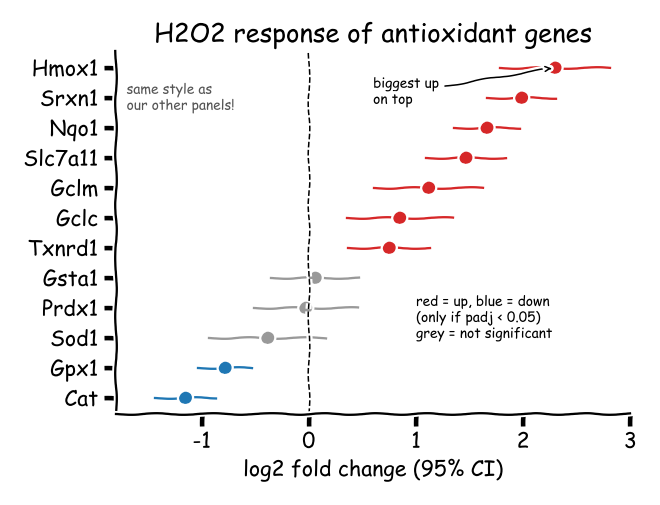
The request to the AI assistant:
"Make this figure from data.csv and sketch.png in
examples/case_c/request/(Case C). The project isantioxidant-effects."
2. The interpretation and its confirmation (before drawing)
By the Case C rules the AI shows its interpretation and gets it approved before making any code (the ingest_plot skill, C-2). The interpretation shown this time:
Settled from the sketch and the data
- Kind of figure: a dot + 95 % confidence interval per gene. The existing renderer
effect_dotsdraws this shape, so it is reused rather than made anew. - Columns:
gene→ row name,log2fc→ the dot,ci_low/ci_high→ the ends of the interval. - Order: largest
log2fcon top ("biggest up on top"). - Colour rule: up if
padj < 0.05and increased, down ifpadj < 0.05and decreased, otherwise not significant. The threshold 0.05 is written in the sketch. - Extras: a dashed line at x = 0, the title, the x-axis title.
- "same style as our other panels": read as the project's print preset (text sizes, line widths, final-size rendering).
What the sketch could not settle: questions and answers
| Question | Options | Answer |
|---|---|---|
| A. Colours | the sketch's red and blue as drawn, or a colour-blind-safe palette (recommended: the red-blue pair would trigger a preflight colour warning) | As recommended: the safe palette |
| B. Where to apply the colour rule | (1) add a "colour by threshold" option to the renderer (recommended: adjusted in the config alone, reusable by other projects), (2) have the analysis script compute a class column | As recommended: (1) |
| C. Legend | (1) a small legend, (2) no legend, explained in the figure caption | An item shown without a recommendation. The AI chose (1) and gave its reason (so the figure reads on its own) |
| D. Size | single column (85 mm wide, about 70 mm tall) | As recommended |
The researcher's answer was one line: "Go ahead as recommended." When the AI decides an item that had no recommendation, like C, it says so and why in its report, so the choice can be changed at the review.
3. Interpretation → bundle, and what was added to the renderer
Following answer B, three options were added to effect_dots. Existing figures are unchanged, and later projects can use them.
item_sort: estimate_desc: rows with larger values on topcolor_by: thresholdwithsig_col,sig_threshold,up_color,down_color,ns_color,class_labels: colours by direction and significancezero_line_style: the style of the zero line (dashed and so on)
The bundle (examples/case_c/effects_bundle/) holds inputs/data.csv, the request's data copied unchanged, metadata/reference.png, a copy of the sketch, and the confirmed values. Each value is commented with whether it was read from the sketch or answered by the researcher, and param_source: inferred_from_mockup says the values were not taken from code.
# Case C example (docs/tutorials/case_c_from_sketch.md): the bundle made from
# request/data.csv and request/sketch.png -- no code. inputs/data.csv is the
# request's table, copied unchanged; metadata/reference.png is the sketch.
# Every plot_params value below was read from the sketch and the data, or is
# an answer the researcher gave at the confirmation step (2026-10-13).
# Synthetic data.
plot_type: effect_dots
param_source: inferred_from_mockup    # not extracted from code: check against reference.png
plot_params:
  # what is plotted (from the data's columns)
  item_col: gene                      # one row per gene
  estimate_col: log2fc                # the dot
  low_col: ci_low                     # the interval, 95 % CI ("log2 fold change (95% CI)")
  high_col: ci_high
  item_sort: estimate_desc            # sketch: "biggest up on top"
  # colour by direction and significance (sketch note; researcher: a renderer option)
  color_by: threshold
  sig_col: padj                       # sketch: "(only if padj < 0.05)"
  sig_threshold: 0.05
  up_color: "#D55E00"                 # researcher: a colour-blind-safe palette, not the sketch's red/blue
  down_color: "#0072B2"
  ns_color: "#9CA3AF"
  class_labels: {up: "Up", down: "Down", ns: "n.s."}
  # marks
  zero_line: true                     # sketch: dashed line at 0
  zero_line_style: "--"
  # text
  title: "H2O2 response of antioxidant genes"
  xlabel: "log2 fold change (95% CI)"
  legend: true                        # researcher: a small legend (the sketch had a note)
4. Bundle → figure (do it yourself)
From here you can follow along. At the repository root, create the project and attach the bundle.
fa new project antioxidant-effects
mkdir -p raw_data/antioxidant-effects
cp -r examples/case_c/effects_bundle raw_data/antioxidant-effects/
fa bundle check raw_data/antioxidant-effects/effects_bundle
fa ingest bundle raw_data/antioxidant-effects/effects_bundle --project antioxidant-effects
Make it single column, as answered in D: change two lines of the figures block in configs/config_antioxidant-effects.yaml.
height_mm: 70 # Figure height in mm (width = the page content width); raise if panels feel cramped
width_mm: 85 # Figure width in mm; null = the page content width, 85 = one journal column
fa build antioxidant-effects --preflight
You get [ok] antioxidant-effects: 0 error(s), 0 warning(s) and PASS: 5/5 checks passed.
5. Review (after drawing)
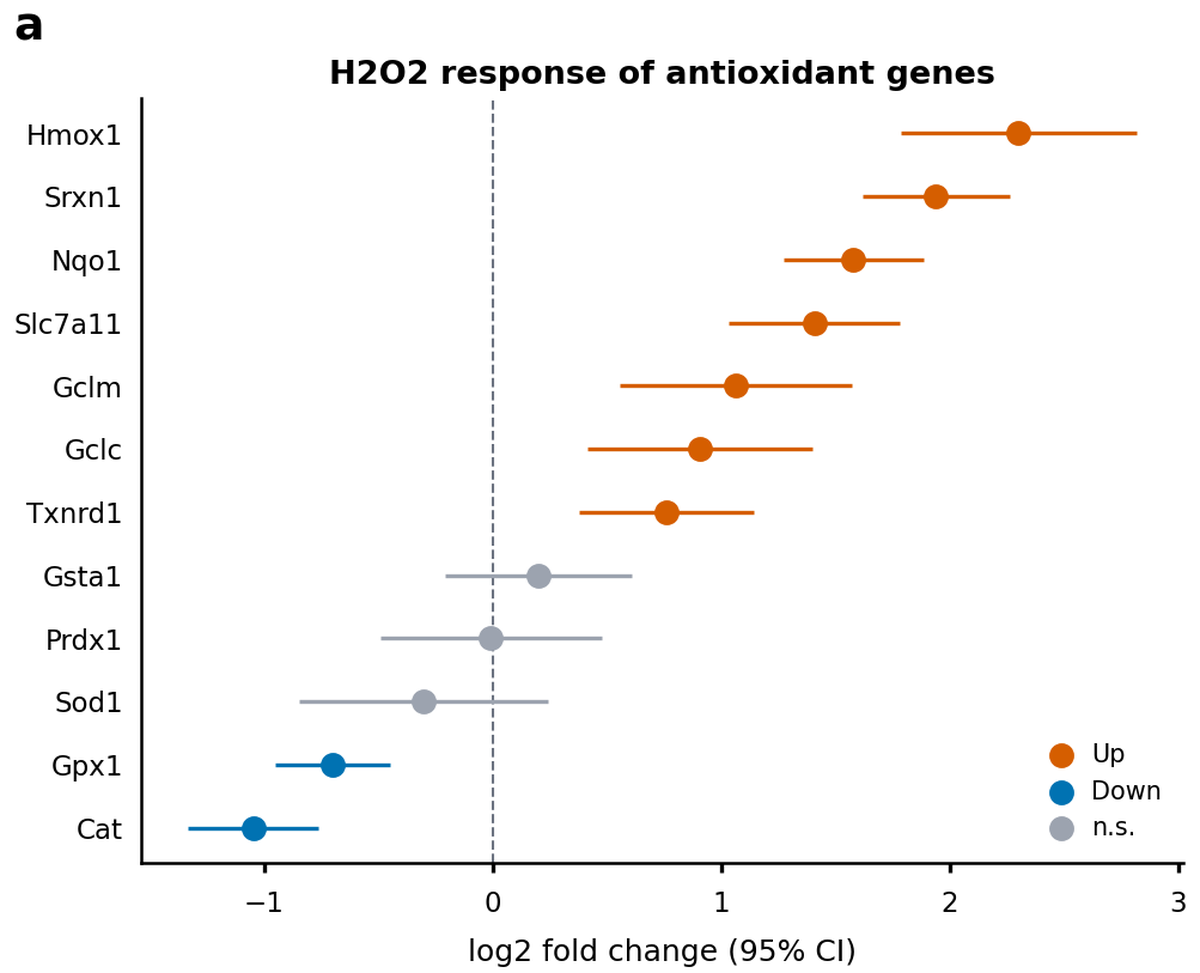
With the result, the AI reported what matched the sketch and what did not.
- As in the sketch: dot + 95 % confidence interval, largest increase on top, the dashed zero line, the title and axis title, the colour rule (7 up, 2 down, 3 not significant).
- Changed per the answers: red and blue → the safe palette, the handwritten note → a legend, the hand-drawn font → the print font and sizes.
- Asked to be checked: a single panel carries panel tag
aat its upper left, there for when it is combined with other panels.
The researcher decides. This time it ended with "OK". If something needs fixing, say so — "make the dots a little smaller", "move the legend to the upper right" — and the AI changes only the config's values and builds again. The code does not change.
6. What remains
- The bundle: the original data (unchanged), the sketch (
reference.png), and values that say where each came from. - The config: the block
fa ingest bundlewrote, with every parameter and its explanation. Later adjustments are made here. - The renderer: the new options of
effect_dots. The next request for this shape only needs interpreting. - The provenance record: which data, code and settings made the figure (
figure_01.provenance.json).
If the shape matches no existing renderer, the AI makes a new one (fa new renderer). Confirming the interpretation and reviewing the result stay the same.