8. Reading the check results
Has this ever happened to you? Only at the proofs did you see that tick numbers overlapped, a panel title was cut off, and lines told apart only by red and green could not be told apart in black and white.
The key idea: two checks run automatically when you build. Preflight looks for problems in the figure itself, verify checks that the results are complete. Errors must be fixed; warnings you read and judge.
Preflight
Preflight draws the figure at its real size and finds, in advance, the problems a person would find in the proofs.
| What it looks at | Examples |
|---|---|
| Overlapping text | Tick numbers overlapping each other, text of neighbouring panels overlapping |
| Clipping and intrusion | Text running off the figure, a legend or axis title covering the next panel |
| Size | Text too small when printed (under 5 pt), lines too thin, images of low resolution |
| Fonts | Font formats journals do not accept, a missing font replaced by another |
| Colour | Colour pairs colour-blind readers find hard to tell apart, rainbow colour bars, too little contrast between text and background |
| Consistency | Alignment and size of the panel tags (a, b, c), one or two texts in an odd size (usually a mistake) |
Results come in three levels.
| Level | Meaning | What to do |
|---|---|---|
| error | Clearly a problem in print. | Always fix it. A figure with errors left is not "done". |
| warn | May be a problem. | Read and judge. If it is intended, you may leave it. |
| info | Good to know. | Look when you need it. |
Example: a clipped title
After panel a's title was made longer, this came out:
error  clipped_by_saved_area  text 'Viability of three compounds after 48 h ' extends 4.4 mm past the saved area
error  clipped_by_saved_area  text 'a' extends 4.4 mm past the saved area
warn   cvd_indistinct         legend of axes[0]: #ff7f0e and #2ca02c look alike with protanomaly
- The first two lines (errors): the title and the panel tag a run 4.4 mm past the left edge of the figure and are cut off.
- The third line (a warning): orange and green look alike to readers with red weakness (fixed in chapter 6).
Where each problem is, you see in a marked-up picture (overlay): every problem is a numbered box.
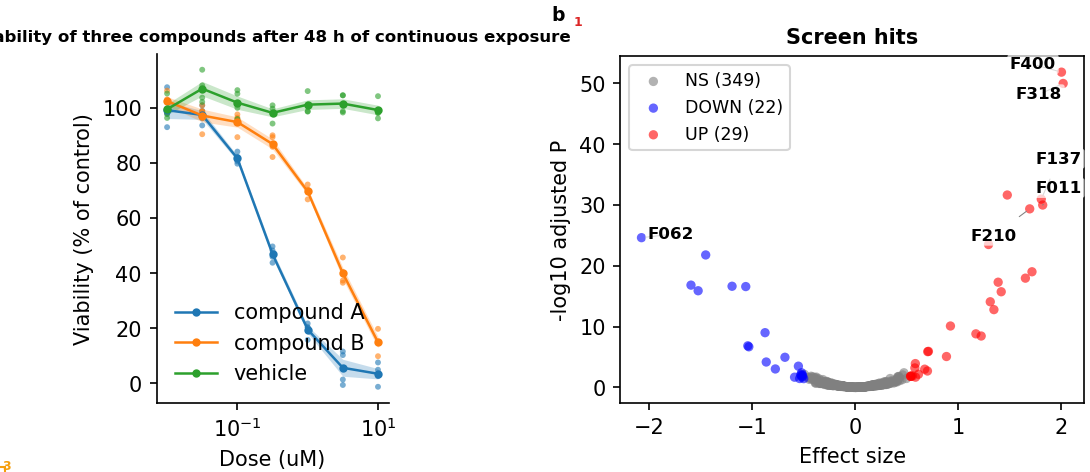
To fix it, shorten the title in the config (labels_title) or make the figure taller or the margins wider. Each finding comes with a hint saying which way to fix it (here, "widen the margin or move the text inwards").
Verify
Verify checks that the results are complete and agree with each other.
| What it looks at | It fails when |
|---|---|
| Figure files | One of PNG, PDF and SVG is missing or empty |
| The figure's README | The README is missing or lacks the panel notes |
| Live numbers | A legend has a placeholder such as {n_hits} but the analysis recorded no value (chapter 9) |
| Statistics tables | A figure with stars has no statistics table (chapter 9) |
| Original images | A microscope image's original differs from its recorded fingerprint (chapter 9) |
| Preflight | Reports the numbers of errors and warnings too |
The result is PASS / WARN / FAIL. On FAIL the build ends as failed and tells you what is wrong.
What you do
💬 Ask an AI: "Build first-figure with preflight and explain the errors and warnings." Then: "Fix the errors in the config. Ask me first if colours or design have to change."
The rules tell the AI to fix errors in the config but to ask first before a change that alters what the figure means, such as colours or design. Warnings it does not fix, only reports. The decision is yours.
⌨ Command: fa build first-figure --preflight
💡 Tip (if you use VS Code): the Ctrl+Shift+B build button builds without preflight. To include the checks, use the command above or the AI.
Good to know
- When a warning can stay: background points greyed out on purpose, decorative elements with low text contrast and the like. It is enough that the researcher has confirmed the intent.
- A figure that shows a defect on purpose: if the point is to show a defect (a teaching figure, a "before" panel), mark its axes with
fa-allow:<name>(ask the AI) and write<name>: "<reason>"underallow:in the config'spreflight:block. Findings inside those axes become info, with the reason. Without a reason, nothing is allowed. - Strict mode before submission: put
mode: enforceunderpreflight:in the config, and preflight errors make verify fail. Nothing can slip through with errors left. - Where the overlays are:
outputs/preflight/project-name/. The full list of findings is inoutputs/preflight/preflight_findings.csv.
Previous: 7. Checking the results · Next: 9. Transparency in numbers, statistics and images